
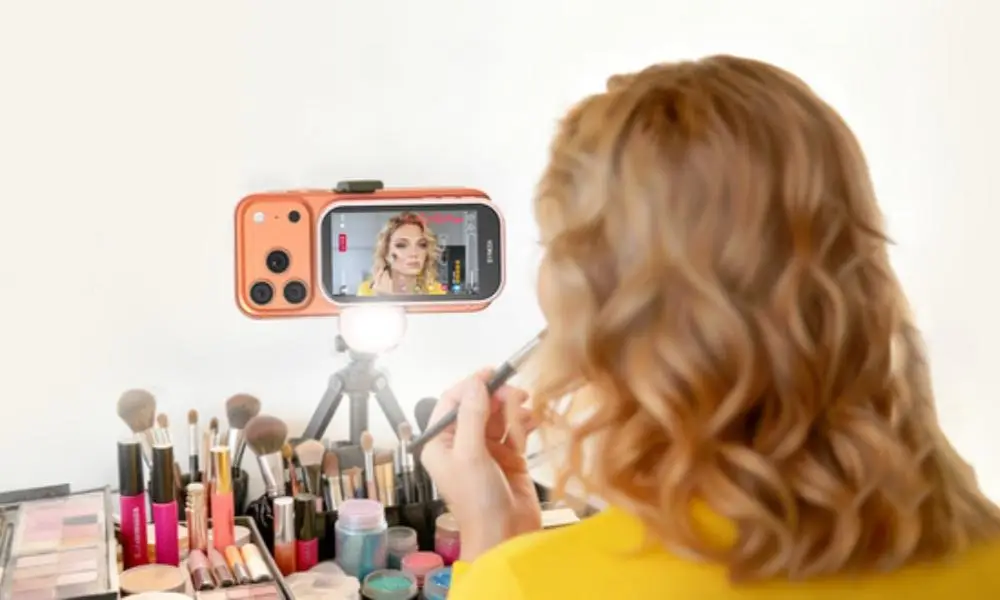
A smartphone can already take photos, record videos, and run many apps. But when you want to record yourself with the rear camera, there is a simple problem. The camera faces you, while the phone screen faces away from you.
A smart phone monitor is designed to solve this problem. It is a small external screen that connects to a smartphone and lets you see the rear camera view from the front. Unlike a large monitor that mainly gives you a bigger phone display, this type is made for mobile shooting.
The word “smart” in this type of product also has a specific meaning. It can refer to built-in AI functions that make the monitor more useful during self-shooting. For example, AI can recognize hand gestures and let you control the camera without touching the phone.
What Is a Smart Phone Monitor?
A smart phone monitor is a compact external screen designed to work with a smartphone, especially when using the phone’s rear camera for self-shooting.
The monitor receives the camera view from the phone and displays it on its own screen. You can then place the phone in front of you and still see the live preview.
This is different from a large external monitor used mainly to mirror a phone screen. A smart phone monitor is small and portable. It is designed to become part of a mobile shooting setup.
The screen can show you whether your face is in the frame, whether your body is in the right position, and whether the camera angle looks correct.
Some models also add smart functions. These can include AI gesture recognition, remote camera control, or other tools that make self-shooting easier.
So, a smart phone monitor is not simply a second screen. It is a small camera monitor with features designed around smartphone photography and video.
Why Do You Need a Smart Phone Monitor?
The main reason is the difference between the front and rear cameras.
The front camera is convenient for selfies because you can see yourself on the phone screen. However, the rear camera is often more capable. It may provide better image quality, better autofocus, or more advanced camera functions.
When you switch to the rear camera, you lose the ability to see yourself.
This makes self-shooting harder.
You may place the phone on a tripod, walk in front of it, take a test photo, and then walk back to check the result. If the framing is wrong, you have to repeat the process.
A smart phone monitor puts the camera preview where you can see it.
You can use the rear camera while watching the image from the front. This makes it easier to frame yourself and record alone.
The monitor is especially useful when the phone is placed several feet away. You do not need to walk back to the phone every time you want to check the shot.
What Makes a Smart Phone Monitor “Smart”?
The word “smart” refers to the AI-powered functions built into the phone monitors.
A basic monitor mainly shows an image. A smart model can add functions that help you interact with the shooting setup.
One example is AI gesture control.
An AI-enabled monitor can recognize specific hand movements. Instead of walking back to the phone or using a physical remote, you can make a supported gesture in front of the camera.
The system recognizes the gesture and performs the related action.
For example, a gesture may start a timer, take a photo, or change the camera view.
This can be useful when you are standing several feet away from the phone.
You do not need to touch the phone to start shooting. You can remain in position and control supported functions from a distance.
This is one of the main differences between a basic phone camera monitor and a smart model with AI features.
How Does AI Gesture Control Work?
AI gesture control uses the phone camera and the monitor’s software to recognize hand movements.
You first position the phone and monitor for shooting. Then you stand in front of the camera.
When you make a supported gesture, the system analyzes the movement and identifies the intended command.
The monitor can then trigger the related function.
The exact gestures and commands depend on the product. Some systems may support several different actions, such as starting a timer, taking a photo, or adjusting the view.
The benefit is simple: you can control the shooting process without holding a remote or walking back to the phone.
This can make solo photography and video recording more convenient.
Who Needs a Smart Phone Monitor?
Smart phone monitors are useful for people who often create content with their phones.
Content Creators
Vloggers and social media creators can use a monitor to see themselves while recording with the rear camera.
This makes it easier to keep the right position and check the composition.
AI gesture control can also help when the creator needs to start or control a shot without touching the phone.
Photographers
People who take self-portraits can use the monitor to check the camera view before taking a photo.
The rear camera can be used for better image quality, while the monitor provides the preview.
People Who Record Alone
A smart phone monitor is also useful for everyday users.
You may want to record a travel video, fitness video, tutorial, or family photo without asking someone else to operate the phone.
The monitor lets you see the camera view and, with supported AI controls, operate the camera from where you are standing.
How Can a Smart Phone Monitor Be Used for Selfies?
Using a smart phone monitor for selfies is simple.
First, place the smartphone on a tripod or another stable support. Point the rear camera toward the area where you will stand.
Next, attach the monitor to the phone or place it where you can see it clearly.
Connect the monitor to the smartphone using its supported connection method.
Once the camera preview appears, stand in front of the phone.
You can now see yourself on the monitor while using the rear camera.
Adjust your position until the framing looks right. You can check your face, body, clothing, and background before taking the photo.
If the monitor supports AI gesture control, you may also be able to start the timer or take the photo with a hand gesture.
This is especially useful for full-body photos because you can move farther away from the phone while still controlling the shot.
Can a Smart Phone Monitor Help With Video?
Yes. Video is one of its most useful applications.
When recording a vlog or short video, you need to know whether you are still inside the frame.
A smart phone monitor shows the live camera view while you are recording.
You can see if you have moved too far left or right. You can also check whether the camera angle needs adjustment.
This is useful for talking videos, product demonstrations, tutorials, livestreams, and other content.
AI control can make the process even easier. If you need to start recording while standing in front of the camera, a supported hand gesture can reduce the need for a separate remote.
What Other Features Can a Smart Phone Monitor Have?
AI is one smart feature, but it is not the only one.
Some models may support both wired and wireless connections. A wireless connection can make the setup cleaner, while a wired connection may support a high-quality camera preview.
Some monitors may also include a built-in fill light. This can help when you record indoors or in low-light conditions.
A remote shutter can also be useful. It allows you to take photos from a distance without touching the phone.
A magnetic mounting system can make the monitor easier to attach to compatible phones or phone accessories.
These features do not change the basic purpose of the monitor. They simply make the mobile shooting setup easier to use.
Conclusion
A smart phone monitor is a compact external screen designed to make smartphone photography and video easier, especially when using the rear camera.
Its basic job is to show the camera view from a position where you can see yourself. This solves the problem of using a rear camera while standing in front of the phone.
What makes it “smart” is the addition of intelligent functions. AI gesture control is one example. It can recognize supported hand movements and let you control certain shooting actions without touching the phone.
For creators, photographers, and anyone who often records alone, a smart phone monitor can turn a smartphone into a more flexible self-shooting setup.